Open topic with navigation
You are here: Getting Started > Advanced Project Creation > Use Pre-defined Libraries
Use Pre-defined Libraries
The Libraries toolbox allows you to select the functions.
For an exhaustive list, refer to:
-
-
- The (All) category at the top enables you to see the full list of available blocks.
- You can access a specific function by entering its initial letters on the keyboard (if the elapsed time between two strikes is greater than 1 second, the KAS considers the last letter as the new initial).
Drag-and-drop into the editors
- When the function is selected, move it with a drag-and-drop operation in the program editor
- In the editor, right-click on a function to set the number of input pins if the block allows an extension.
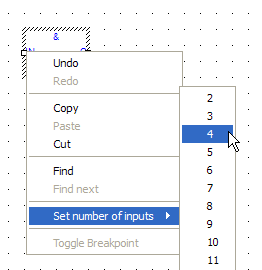
Figure 4-35: Set the Pins Number of the Block
Drag-and-drop into the dictionary
If you have selected a function block, you can drag-and-drop it in the program declaration within the Dictionary toolbox, to create an instance of that object.
|
|
Copyright © 2015 Kollmorgen™
|
|

|
Open topic with navigation


